Rendering Examples
All screenshots below are actual output of Markdown Renderer for GitHub running on a live WordPress site — no mockups. Each example shows the Markdown you write and the result your visitors see.
GitHub Flavored Markdown
Tables
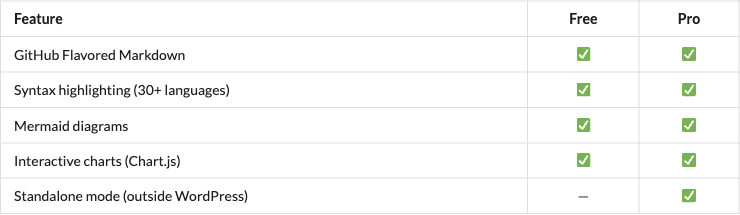
Write a plain GFM table:
markdown
| Feature | Free | Pro |
|---------|:----:|:---:|
| GitHub Flavored Markdown | ✅ | ✅ |
| Syntax highlighting (30+ languages) | ✅ | ✅ |
| Mermaid diagrams | ✅ | ✅ |
| Interactive charts (Chart.js) | ✅ | ✅ |
| Standalone mode (outside WordPress) | — | ✅ |
…and it renders with GitHub-style borders, alignment, and zebra striping:
Syntax Highlighting
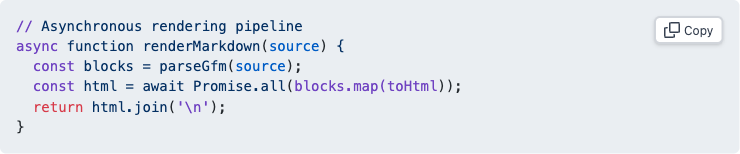
Fenced code blocks are highlighted by Shiki (the same engine as VS Code) and get a copy button:
markdown
```javascript
// Asynchronous rendering pipeline
async function renderMarkdown(source) {
  const blocks = parseGfm(source);
  const html = await Promise.all(blocks.map(toHtml));
  return html.join('\n');
}
```
Mermaid Diagrams
Flowchart
markdown
```mermaid
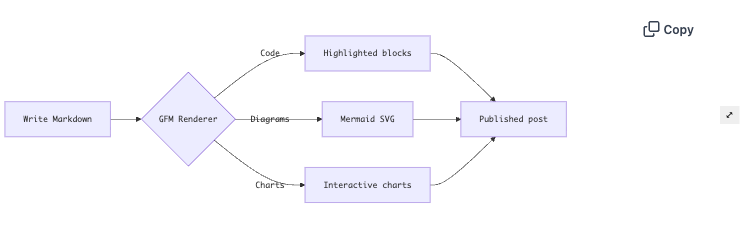
flowchart LR
    A[Write Markdown] --> B{GFM Renderer}
    B -->|Code| C[Highlighted blocks]
    B -->|Diagrams| D[Mermaid SVG]
    B -->|Charts| E[Interactive charts]
    C --> F[Published post]
    D --> F
    E --> F
```
Sequence Diagram
markdown
```mermaid
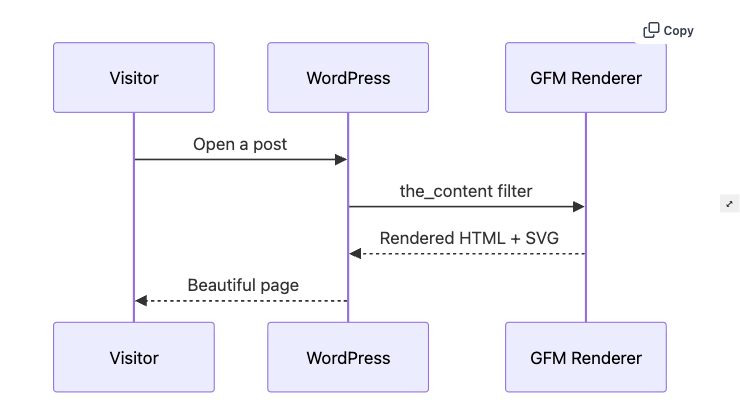
sequenceDiagram
    participant V as Visitor
    participant W as WordPress
    participant R as GFM Renderer
    V->>W: Open a post
    W->>R: the_content filter
    R-->>W: Rendered HTML + SVG
    W-->>V: Beautiful page
```
Lightbox included
Click any Mermaid diagram on a real page to open a full-screen lightbox with pan & zoom — try it on the demo site.
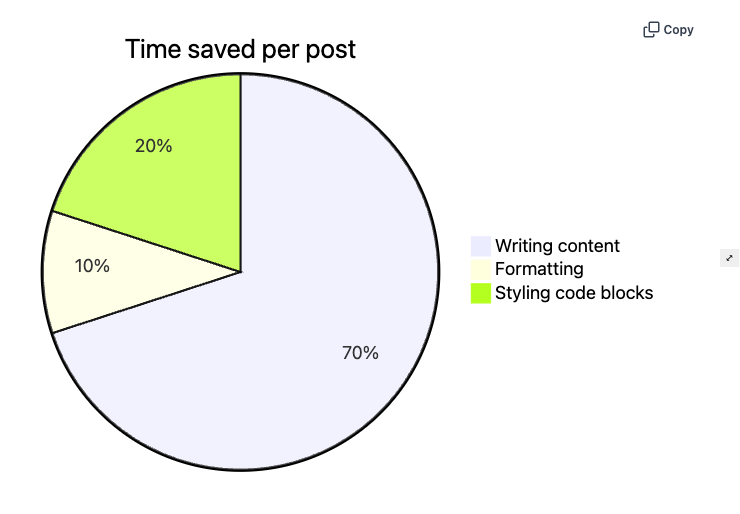
Pie Chart (Mermaid)
markdown
```mermaid
pie title Time saved per post
    "Writing content" : 70
    "Formatting" : 10
    "Styling code blocks" : 20
```
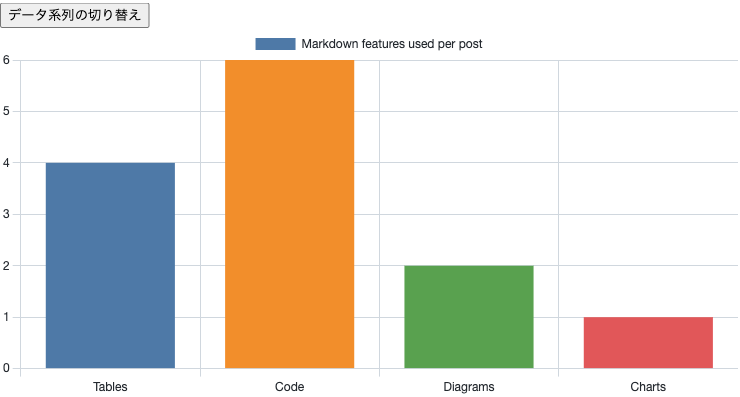
Interactive Charts (Chart.js)
Define a chart with a chart code fence and JSON — it renders as a responsive, interactive Chart.js canvas:
markdown
```chart
{
  "type": "bar",
  "data": {
    "labels": ["Tables", "Code", "Diagrams", "Charts"],
    "datasets": [{
      "label": "Markdown features used per post",
      "data": [4, 6, 2, 1],
      "backgroundColor": ["#4e79a7", "#f28e2b", "#59a14f", "#e15759"]
    }]
  }
}
```
Try It Yourself
- 🔗 Open the live demo post — the exact page captured above
- 📦 Product overview — features, pricing, and installation
- 🚀 Pricing & Plans — get the Pro version